Master Your Stream with the Retro Gaming Twitch Kit
Building a captivating and professional Twitch channel presents a unique set of challenges for streamers. Creating visual consistency, managing technical layouts for different stream elements, and establishing a memorable brand identity are crucial yet time-consuming tasks. For content creators looking to carve out a niche in the retro gaming community or simply evoke the nostalgic charm of 80s and 90s video games, finding the right aesthetic tools is essential. The Retro Gaming Twitch Kit is a comprehensive design solution specifically engineered to address these needs, offering a fully editable suite of overlays and assets with a distinct retro pixel design.
The Streamer's Challenge: Branding and Technical Consistency
When you go live, your viewers' first impression is visual. A disjointed or generic look can undermine your content, even if your gameplay and commentary are top-tier. Streamers often face the dilemma of investing significant hours learning complex design software or spending money on pre-made assets that might not be fully customizable to their specific channel. You need elements that work together seamlessly: a place for your webcam that doesn't obscure critical game information, an offline screen that maintains your brand presence, and profile graphics that attract followers across platforms. This kit is designed to solve that cohesion problem by providing a unified, theme-driven package where every component is crafted to work in harmony.
How the Retro Gamer Twitch Kit Elevates Your Channel
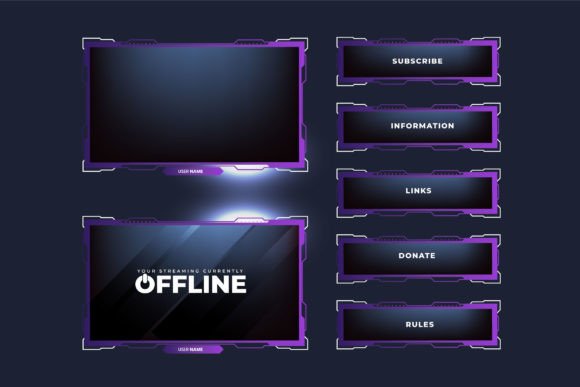
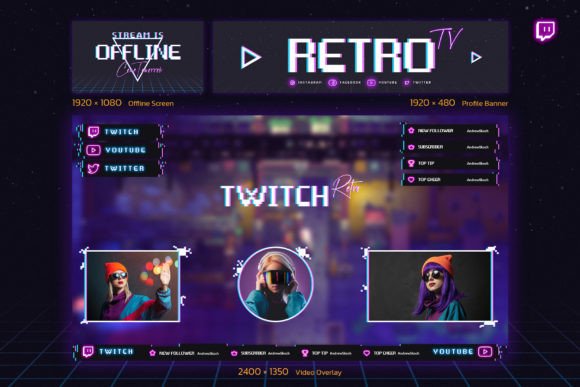
This kit goes beyond being a simple collection of images. It is a foundational branding tool. By adopting the Retro Gaming Twitch Kit, you immediately establish a strong, nostalgic aesthetic with its neon text, pixel icons, and vibrant 80s-inspired color palette. This visual identity helps you stand out in a crowded marketplace and instantly communicates your channel's theme to potential viewers. More practically, it removes the technical guesswork. The kit includes specially designated places for your live chat and webcam video, accommodating popular formats like 4:3, 16:9, and even a round frame, allowing you to choose what best complements your gameplay layout. Pre-built indicator bars and social media link sections further professionalize your broadcast without requiring you to design them from scratch.
Practical Applications and Immediate Outcomes
Implementing the Retro Gaming Twitch Kit leads to tangible improvements in your streaming workflow and channel presentation. The included fully editable Photoshop templates (PSD files) are the core of its utility. Whether you are proficient in Photoshop or a beginner following the provided instructions, you can personalize every detail. You can change all text to match your channel name, modify colors to suit your preference, or reposition elements. This means the offline screen, profile banner, and overlays become uniquely yours, not just a generic template.
The practical outcomes are clear: a professionally branded live stream that looks coordinated from the moment a viewer sees your profile banner (optimized at 1920x480 pixels) to when they join your live broadcast with its polished webcam overlay (1920x1080 px). The main overlay, designed at 2400x1350 pixels for high-resolution displays, ensures your game screen remains the focus while branded elements frame it perfectly. This cohesion builds trust and engagement, encouraging viewers to return because your channel feels established and cared for.
Tailoring the Kit to Your Specific Needs
Different streamers will leverage the Retro Gaming Twitch Kit in different ways. A veteran streamer revamping their channel might dive deep into the Photoshop files, tweaking every pixel to create a bespoke version. A new streamer focused on content creation can use the "ready-to-use" aspects, quickly applying the beautifully designed default assets to hit the ground running with a professional look. Retro gaming historians might emphasize the nostalgic icons and neon text to reinforce their commentary on classic games. Meanwhile, a streamer playing modern games with a retro aesthetic might use the kit to create a fun, contrasting visual style. The editable nature of the kit supports all these approaches, making it a versatile resource rather than a rigid template.
Recommendations for Implementation
To get the most value from the Retro Gaming Twitch Kit, start with the provided PDF guide and font links. Ensure you have access to Adobe Photoshop, as the PSD files are the source of all customization. Begin by editing your profile banner and offline screen first; these are your channel's static billboards. Then, move to the live stream overlay. Experiment with the different webcam frame shapes (16:9, 4:3, round) during a test broadcast to see which integrates best with your typical game screen. Remember to keep text edits clear and legible—the neon design is stylish but should not sacrifice readability. Utilize the special elements like the indicator bars to display follower goals or event milestones, adding dynamic content to your static design.
Consider pairing this visual kit with other retro-themed channel enhancements, like 80s synthwave background music or custom pixel-art subscriber alerts, to create a fully immersive experience. The Retro Gaming Twitch Kit provides the visual foundation for such a cohesive brand.
A Solution Focused on Streamer Empowerment
Ultimately, the Retro Gaming Twitch Kit is a solution-focused resource. It acknowledges the real-world needs of streamers: saving time, achieving professional quality, and maintaining creative control. By providing three core PSD files for the key assets, along with helpful instructions, it empowers you to own your channel's look. You are not just downloading images; you are acquiring a customizable design system that grows with your channel. This approach puts the tools in your hands, allowing you to address the perennial challenge of stream branding with a practical, effective, and stylish kit tailored for the retro enthusiast. Implementing it means one less obstacle between you and your audience, letting you focus on what matters most—creating great content and building your community.